
Most people choose hosting the way they choose a phone charger — whichever one is cheapest, or whichever one came bundled with something else. Nobody thinks about it again until it stops working.
The problem is that hosting isn't just "a place your files live." A proper hosting setup is quietly doing dozens of things in the background to keep your site online, fast, and safe — and free or bargain-bin hosting almost never does most of them. You just don't find out until something goes wrong.
So here's a short list. Go check your own site against it — or ask whoever hosts it. It'll take five minutes and it might be the most useful five minutes you spend on your website this year.
Is your hosting actually protecting you? Here's how to find out in five minutes.
The Checklist
- Automatically renewing SSL — the little padlock icon shouldn't be something you have to remember to renew. If it ever lapses, browsers actively warn visitors away from your site.
- Real security headers — not just "HTTPS enabled," but the actual response headers (like a Content Security Policy) that stop a whole category of attacks before they start. Most free hosts don't touch this at all.
- Automatic intrusion protection — repeated break-in attempts against your login or admin panel should get blocked automatically, not just quietly logged somewhere nobody reads.
- Server software that patches itself — the operating system and web server should get security updates on a schedule, not "whenever someone remembers."
- Daily backups, stored somewhere else — a backup sitting on the same disk as the thing it's backing up isn't really a backup. If the server dies, both die with it.
- Someone — or something — watching uptime — you should find out your site is down within minutes, from a monitor, not from a customer emailing to ask if you're still in business.
- An environment that isn't shared with strangers — free and ultra-cheap hosting often crams thousands of unrelated sites onto the same box. Their security mistakes can become your problem.
If even one of these is missing — or you're not sure what it means — that's your answer.
What It Actually Costs You When It's Missing
None of this feels urgent until the day it isn't optional anymore. A lapsed certificate scares visitors off with a browser warning at the worst possible time — mid-launch, mid-campaign, mid-sale. An unpatched server gets compromised quietly, sometimes for months, before anyone notices anything's wrong. A site with no real backup that goes down has no fast way back — hours or days of rebuilding, if it's even possible at all.
And there's a search-engine cost too, not just a technical one. If Google's own systems flag a compromised or insecure site, it can get a warning label right in the search results — or drop out of rankings entirely while it's under review. All the SEO work in the world doesn't help if the platform underneath it isn't holding up its end.
"But Free Hosting Saves Money"
It saves money on the invoice. It doesn't save money on the total cost.
A few hours of downtime during a busy period, a breach that needs cleaning up, or a rebuild from scratch because there was never a real backup — any one of these costs more than years of proper hosting would have. The bill just shows up later, and it's usually bigger and less convenient than the one you were trying to avoid.
This isn't an argument for spending a fortune. It's an argument for knowing what you're actually paying for — and what you're not.
What I Actually Run
I don't host client projects on shared, bargain-tier platforms — everything runs on a properly managed VPS with automatic SSL renewal, real security headers, automated intrusion protection, scheduled server patching, and daily backups that live off the original disk. I also monitor uptime directly, so if something goes down, I know before anyone has to tell me.
The most recent independent review of that setup — covering TLS configuration, security headers, authentication, DNS, and how the infrastructure holds up under active testing — came back at 95/100. I'm not sharing that number to show off. I'm sharing it because it's the same checklist above, actually applied, not just promised.
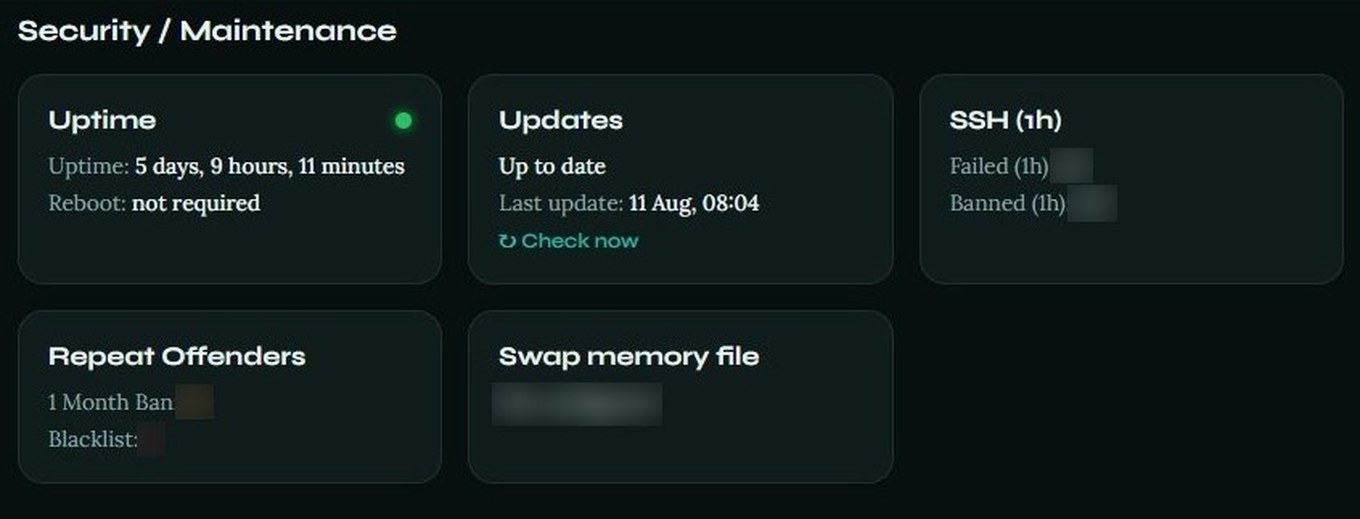
If you're not sure how your own site stacks up against that list, that's a completely normal place to be. Most site owners have never been told to ask.