
Yes. Google Analytics 4 loads a 166 KB script (gtag.js) that competes with your page for the browser's main thread. On my site it pushed Total Blocking Time to 520 ms and the desktop PageSpeed score to 77. After I replaced it, the same page scored 99. How much it costs you depends on your site.
I built my portfolio as plain HTML, CSS and a little JavaScript. No framework, no plugins. It should be fast, and mostly it was, until PageSpeed Insights gave it a 77 and pointed at a script I hadn't written.
Does Google Analytics slow down your website?
Yes, and the mechanism is simple. Analytics needs a script on every page. Google's is gtag.js, and PageSpeed measured it at 166.2 KiB transferred on my site, about 70 KiB of it code the page never used. The browser has to download it, parse it and run it on the main thread, the same thread that draws the page and reacts to taps. While that thread is busy, nothing else gets done.
That shows up as Total Blocking Time (TBT), and TBT carries the biggest share of the Lighthouse performance score, roughly 30%. On my page every other metric was green. TBT was the only red one.
How I measured it
I used PageSpeed Insights: it's free, it's what most people check, and it names the exact script. Same page, same tool, desktop view, two different days.
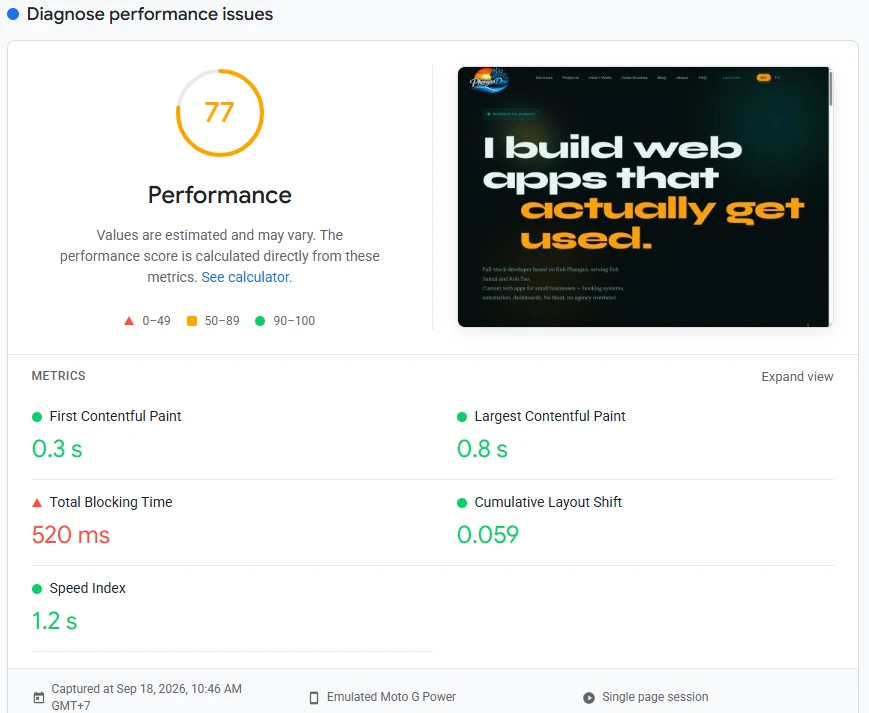
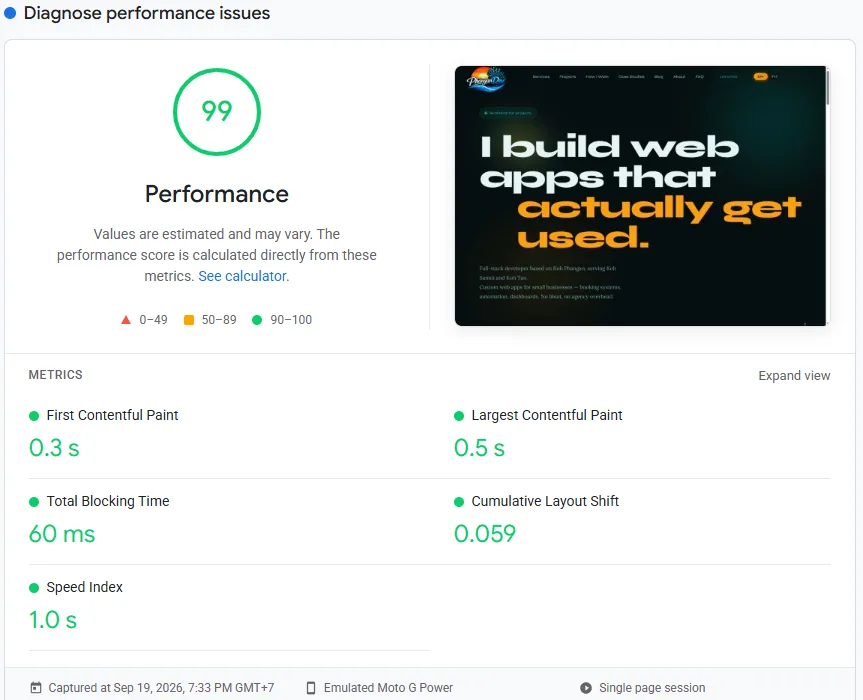
| Metric | With Google Analytics (Sep 18) | Self-hosted counter (Sep 19) |
|---|---|---|
| Performance | 77 | 99 |
| Total Blocking Time | 520 ms | 60 ms |
| First Contentful Paint | 0.3 s | 0.3 s |
| Largest Contentful Paint | 0.8 s | 0.5 s |
| Cumulative Layout Shift | 0.059 | 0.059 |
| Speed Index | 1.2 s | 1.0 s |
Two caveats, because a single test can mislead. PageSpeed is a lab test on shared servers, and it's noisy: runs on the same code gave me anything from 85 to 99 over a single day. The 99 above is the best of them, not the typical one. I also made a few small, unrelated tweaks between the screenshots, like compressing my logo. So don't read "77 to 99" as the exact price of Google Analytics. Read it as this: the one run I have with the script live shows TBT in the red, and every run after I removed it shows a lower TBT.
I'd seen the effect once before, by accident. For a while my Content-Security-Policy silently blocked the Google script, and the same desktop test gave 97. The day I let the script through, it fell to 77.
What makes Google Analytics slow
- Size. 166.2 KiB is almost 19 times my entire stylesheet (8.9 KiB).
- Main-thread work. Parsing and running that code takes time on the thread your page needs. Slower phones feel it more.
- A third-party connection. It lives on another domain, so the browser first does an extra DNS lookup and TLS handshake.
- Code you don't use. PageSpeed flagged roughly 70 KiB as unused. The script ships features your site may never touch.
Not every site will see this. A WordPress site with a dozen plugins may not notice one more script. A lean site like mine did, because there was nothing else to hide behind.
Four ways to fix it
| Fix | Effort | Speed gain | What you give up |
|---|---|---|---|
| 1. Load it later (after the page is interactive, or on first interaction) | Low | Medium: it leaves the critical path, but still costs main-thread time later | Visitors who leave in the first seconds go uncounted |
| 2. Proxy or host the script yourself (first-party or server-side tagging) | Medium to high | Small to medium: the same code still runs | More moving parts to maintain |
| 3. Switch to a lighter tool (Plausible, Umami, Fathom, Cloudflare Web Analytics) | Low to medium | High: a script of a few kilobytes | Google Ads and audience integrations |
| 4. Build a tiny counter of your own (what I did) | High, about a day | Highest | Everything beyond the basics, and you maintain it |
For most small-business owners, option 3 is the sensible choice. I went with option 4 because I run several sites and wanted one dashboard with all the data on my own server.
What I did, step by step
- Removed the
gtag.jssnippet and took Google's domains out of my Content-Security-Policy. - Added a small inline script that sends one request per page view: the path, the referrer, and a random session id kept in
sessionStorage. No cookie. - Built a small Express and SQLite endpoint to receive it. It ignores obvious bots and flags my own visits so they don't inflate the numbers.
- Built a password-protected dashboard: page views over time, top pages, referrers, device split, button clicks and broken-link hits.
- Rolled the snippet out to every page.
The script, simplified:
<script>
(function () {
  var sid = "";
  try {
    sid = sessionStorage.getItem("sid") || Math.random().toString(36).slice(2);
    sessionStorage.setItem("sid", sid);
  } catch (e) {}
  fetch("https://analytics.example.com/api/track", {
    method: "POST",
    headers: { "Content-Type": "application/json" },
    body: JSON.stringify({ site: "mysite", sid: sid, type: "pageview",
      path: location.pathname, referrer: document.referrer }),
    keepalive: true, credentials: "omit"
  });
})();
</script>
It counts page views and referrers. It sets no cookies, builds no visitor profiles and sends nothing to a third party.
What I gave up: Google's audience reports, demographics and Google Ads conversion tracking. I don't run Google Ads, so I don't miss them. If you do, this isn't your route.
Is it worth it for a small business site?
It depends on what else is on your page.
- Heavy site, lots of plugins: Analytics isn't your bottleneck. Fix images and plugins first.
- Lean site, and you only check visits, sources and top pages: a lighter tool is the cheapest speed you'll get.
- You run Google Ads and need conversion tracking: keep Analytics and load it after the page is ready.
Whatever you choose, measure before and after, more than once, on the same page. One number from one run isn't evidence. Mine moved ten points with nothing changed.
FAQ
Does Google Analytics slow down a website?
Yes, it can. GA4 loads a script (gtag.js, 166 KiB on my site) that runs on the browser's main thread. The effect depends on the rest of your page: on a lean site it can be the biggest single cost, on a heavy one it may hardly show.
Does Google Analytics affect SEO rankings?
Not directly. Google has said that Analytics data isn't a ranking signal. A slower page can hurt through Core Web Vitals, which is a small ranking factor, so the script can matter indirectly.
Can I keep Google Analytics without slowing my site down?
Mostly, yes. Load it after the page is interactive or after the first user interaction, or use server-side tagging. The trade-off is that visitors who leave in the first seconds may go uncounted.
Is there a cookie-free alternative to Google Analytics?
Yes: Plausible, Umami, Fathom and Cloudflare Web Analytics are common choices, or you can build a small counter yourself. They count page views and referrers well. They don't replace Google's audience data or Ads conversion tracking.
Will removing Google Analytics affect Google Search Console?
No. Search Console is a separate service, and its verification and data don't depend on Analytics. I kept my Search Console verification tag when I removed the script.